
💡 Quick disclosure before we start: GetSolved also builds an AI detector, so Grammarly is a direct competitor to our tool. We’re writing this review with that conflict out in the open, and we’re not going to soften a real problem just because pointing it out helps our own case. Where Grammarly gets something right, we’ll say so.
Grammarly is best known as a grammar and spelling tool, so its AI detector rides on a lot of existing trust. Millions of people already have it open in a browser tab or even installed on their devices. That’s exactly why it’s worth checking carefully: a detector people already trust for grammar isn’t automatically a detector they should trust for something as consequential as an AI accusation. We built the test around two real documents — one generated with AI and one entirely human-written — to observe the specific signs that content may be AI-generated and understand how this tool flags them in practice.
⚠️ Disclaimer: In this review, we will assess the accuracy of Grammarly AI based on this specific test. Please note that our evaluation reflects performance under these specific test conditions, and results may vary depending on the prompt, topic, text length, or content type.
Nevertheless, let’s move to the results and see if Grammarly AI content detector is worth your time and money.
What Grammarly’s AI Detector Actually Does
Grammarly folded AI detection into its existing editor rather than building a separate product. It sits inside a combined panel called “Check for AI text & plagiarism,” which breaks your document into segments and runs each one against a model trained to recognize language patterns typical of AI writing. So far, that’s how AI detectors analyze writing across most tools in this category — nothing unusual there.
What’s different is how Grammarly reports the result. Rather than a single AI percentage on the document, it flags individual sections directly in the text as “This section resembles AI text.” Then, it gives you one aggregate number at the bottom of the panel — something like “76% of your text has patterns that resemble AI text.”
Subjectively, we find this format a bit unclear, as the AI percentage that users may actually check the text against is hidden at the bottom of the page. It is simply not easy to find on the page unless you search for it. However, we note that it is mostly a web design question and may not affect the tool’s functionality.
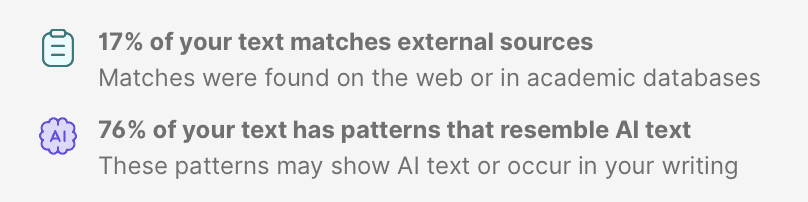
Additionally, the plagiarism and AI checks run in the same panel simultaneously, showing “This text matches” alongside a separate percentage for source overlap. Both checks sit in one place, which is convenient, but it also means the report doesn’t clearly separate “this might be AI” from “this might be copied” at a glance — you have to click into each flag individually to tell which is which.
Our Test: AI-Written Text vs. Human-Written Text
Rather than describing this from memory, we ran two documents through Grammarly’s AI checker ourselves.
🎯 Test 1 — Fully AI-Generated Text
Setup: We took a short, ~264-word piece on remote work productivity that was generated entirely by an AI model. No human editing or additional check grammar and writing issues were applied. This text was pasted into Grammarly’s checker.
Result: Grammarly gave the document an overall writing-quality score of 87/100, marked several individual sentences and paragraphs as “This section resembles AI text,” and totaled it at the bottom: 76% of the text had patterns that resemble AI text, with a separate 17% flagged as matching external sources.
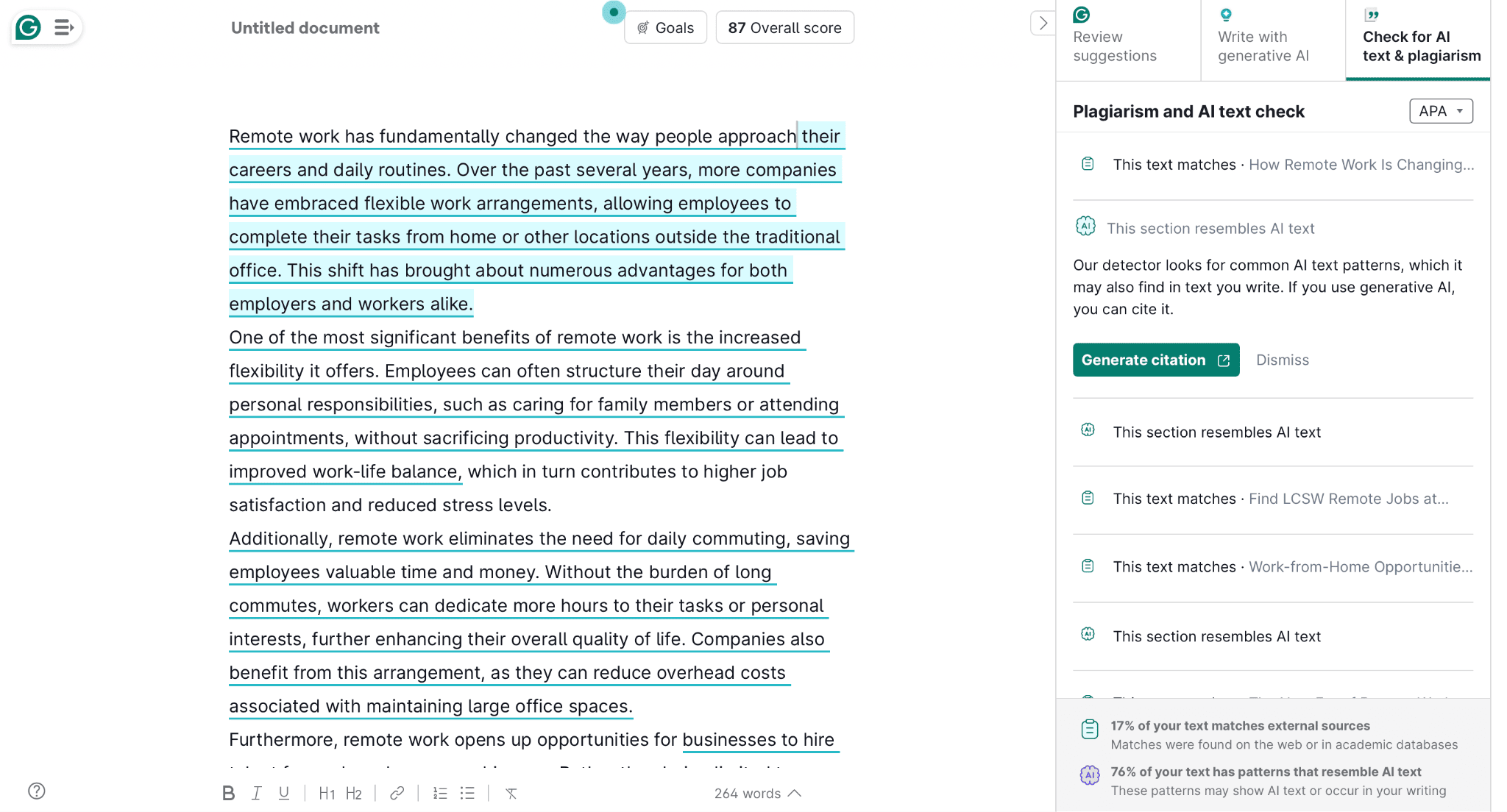
Observation: Since we know this text was 100% AI-generated, a 76% pattern-match reading is directionally correct. However, it’s still short of what a clean detection would look like, and it never resolves to a single number you can point to. You’re left doing the math yourself between the sentence-level flags and the bottom-line percentage.
🎯 Test 2 — Fully Human-Written Text
Setup: We ran a ~1,079-word original essay on fashion and art theory — our own writing, no AI involvement at any point, referencing real sources like Kant and Bourdieu — through the same panel.
Result: Grammarly scored the document 92/100, flagged 6% as matching external sources (mostly legitimate matches to the actual artworks and texts the essay cites), and flagged 48% of the entirely human-written text as having patterns that resemble AI. Several individual paragraphs were separately marked “This section resembles AI text” — including some of the most carefully argued, formally structured passages in the piece.
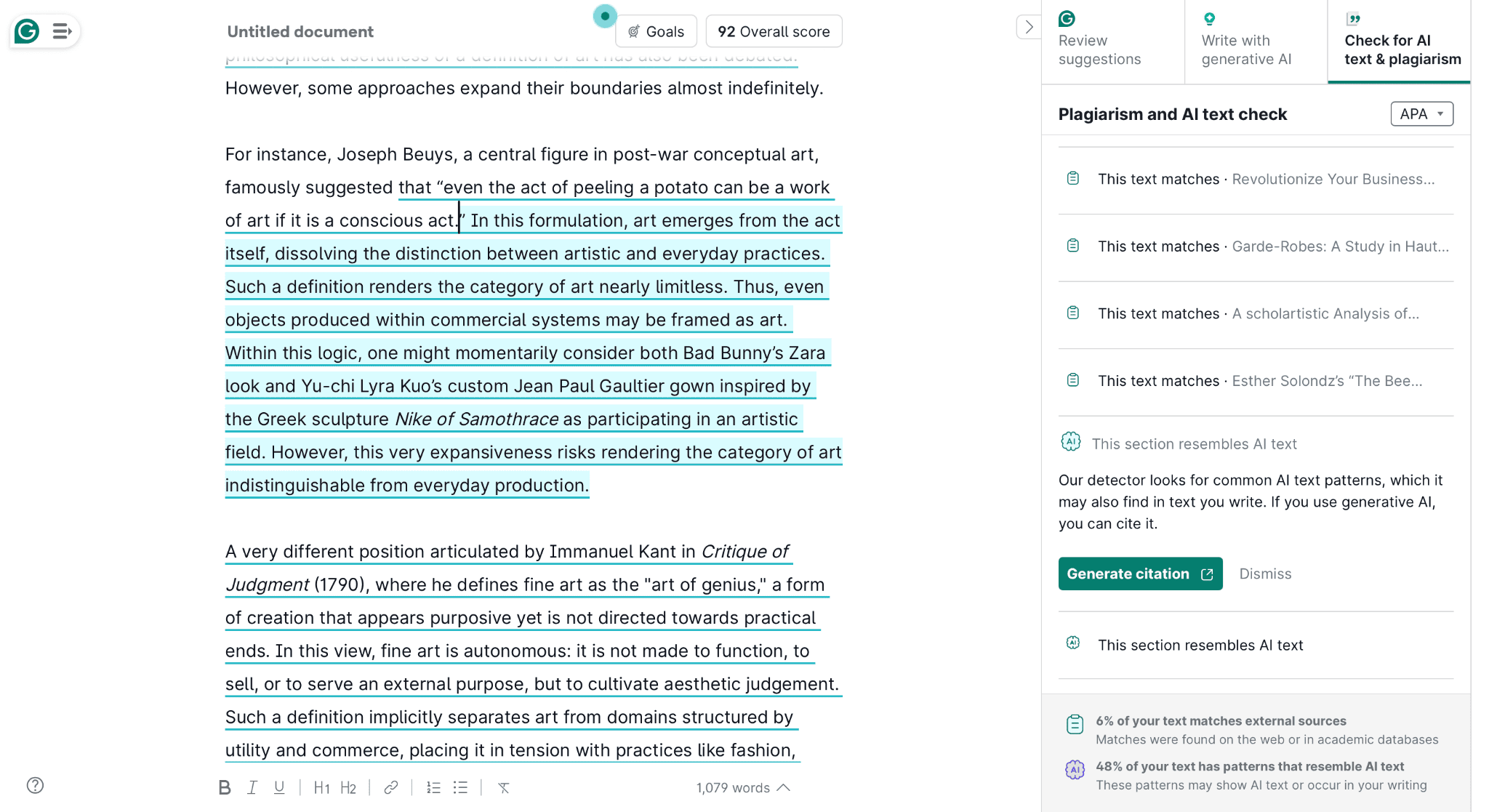
Observation: This is the false-positive problem in practice, not theory. Almost half of a document we know was written entirely by hand got flagged for “resembling” AI, and it wasn’t random — the sections flagged as AI were the most formally structured, clearly argued parts of the essay. That’s a pattern that shows up across independent testing of AI detectors: polished, logically sequenced writing triggers the same statistical signals as AI-generated text because both tend to be more predictable and less “bursty” than casual human writing.
What Else Grammarly AI Checker Analyses
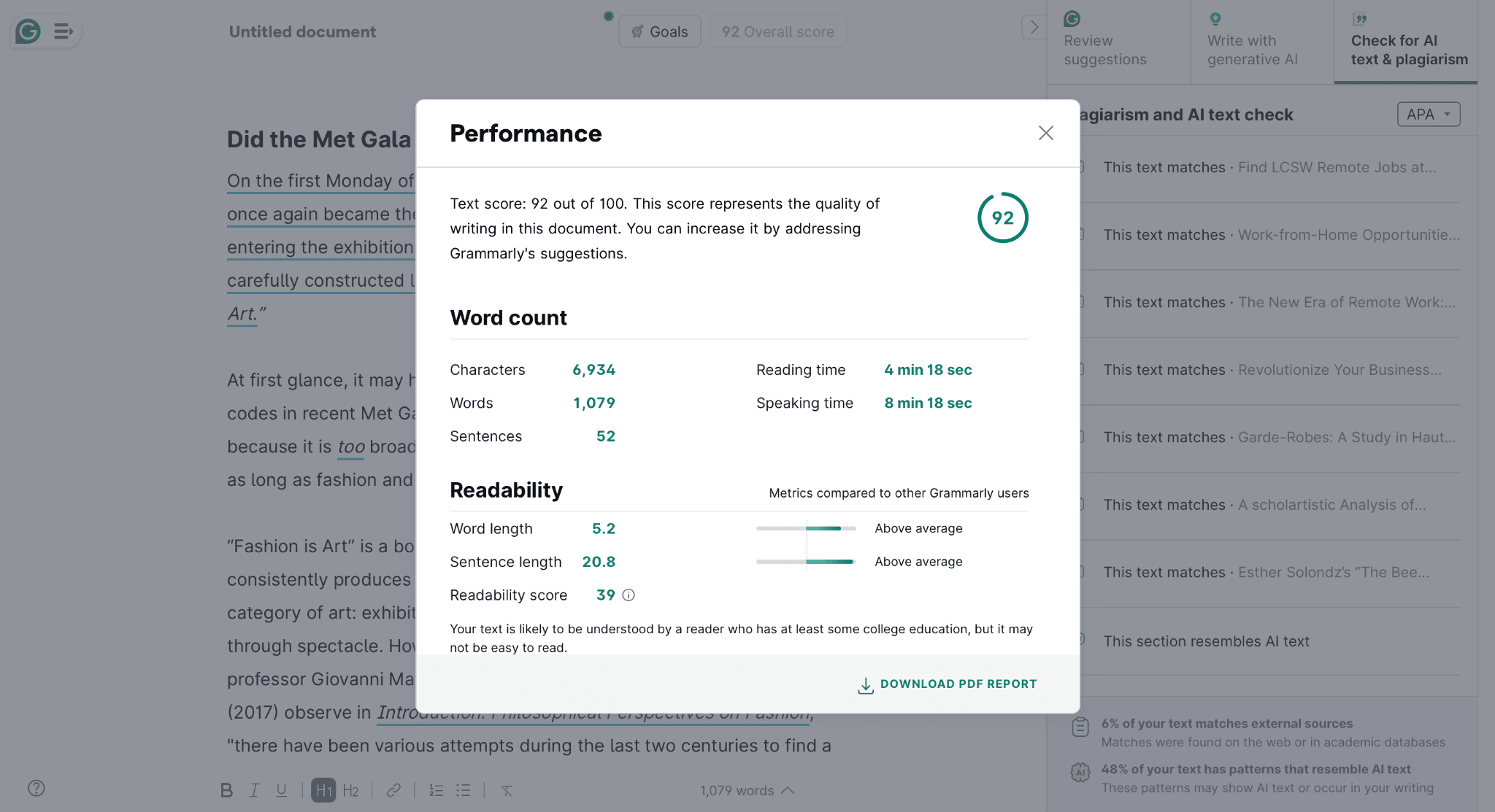
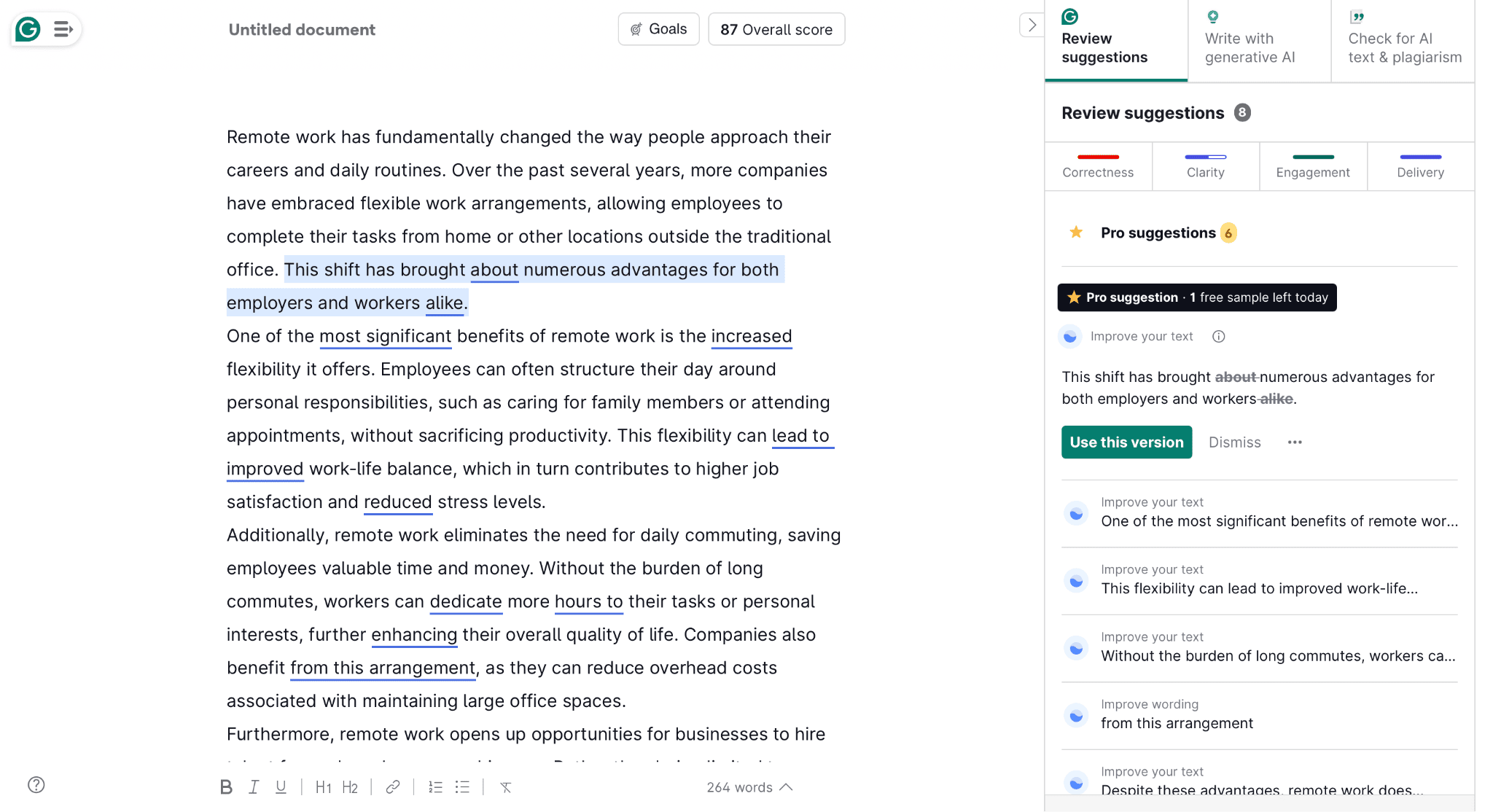
Even though we were not completely satisfied with the AI checker’s results, Grammarly’s platform analyzes texts from multiple angles and presents the results in a single window. For example, Grammarly right away gives you a mark on how your text will perform based on word length, sentence length, and readability score. So, the tool can check how easy your text is to read using Grammarly’s database.
The tool also gives you suggestions you can apply to your text to improve it and boost the mark. It is also really convenient because you have a toolkit of AI writing tools in one window, without switching between platforms.
What the Panel Doesn’t Tell You
The only explanation Grammarly gives for a flagged section is a generic line: “Our detector looks for common AI text patterns, which it may also find in text you write. If you use generative AI, you can cite it.”
That’s honest about the tool’s limits and the fact that it is basic AI content detection. Still, it’s not useful if you’re actually trying to understand why a specific paragraph got flagged. There’s no sentence-level reasoning, no confidence score, nothing pointing to what triggered it beyond “AI text patterns.” If you’re trying to understand what AI detector accuracy looks like in practice across tools, that vagueness is worth factoring in — a tool that can’t explain its own flags is harder to argue with, in either direction. Moreover, this vagueness isn’t what you expect given the tool’s price point (we are talking about pricing below). Thus, we flag this point as a disadvantage of the tool.
On the other hand, the panel does more than just flag AI: it also runs full writing suggestions alongside the check, and you can adjust “Goals” — Domain, Intent, Audience, and Formality — to tailor those suggestions to your document.
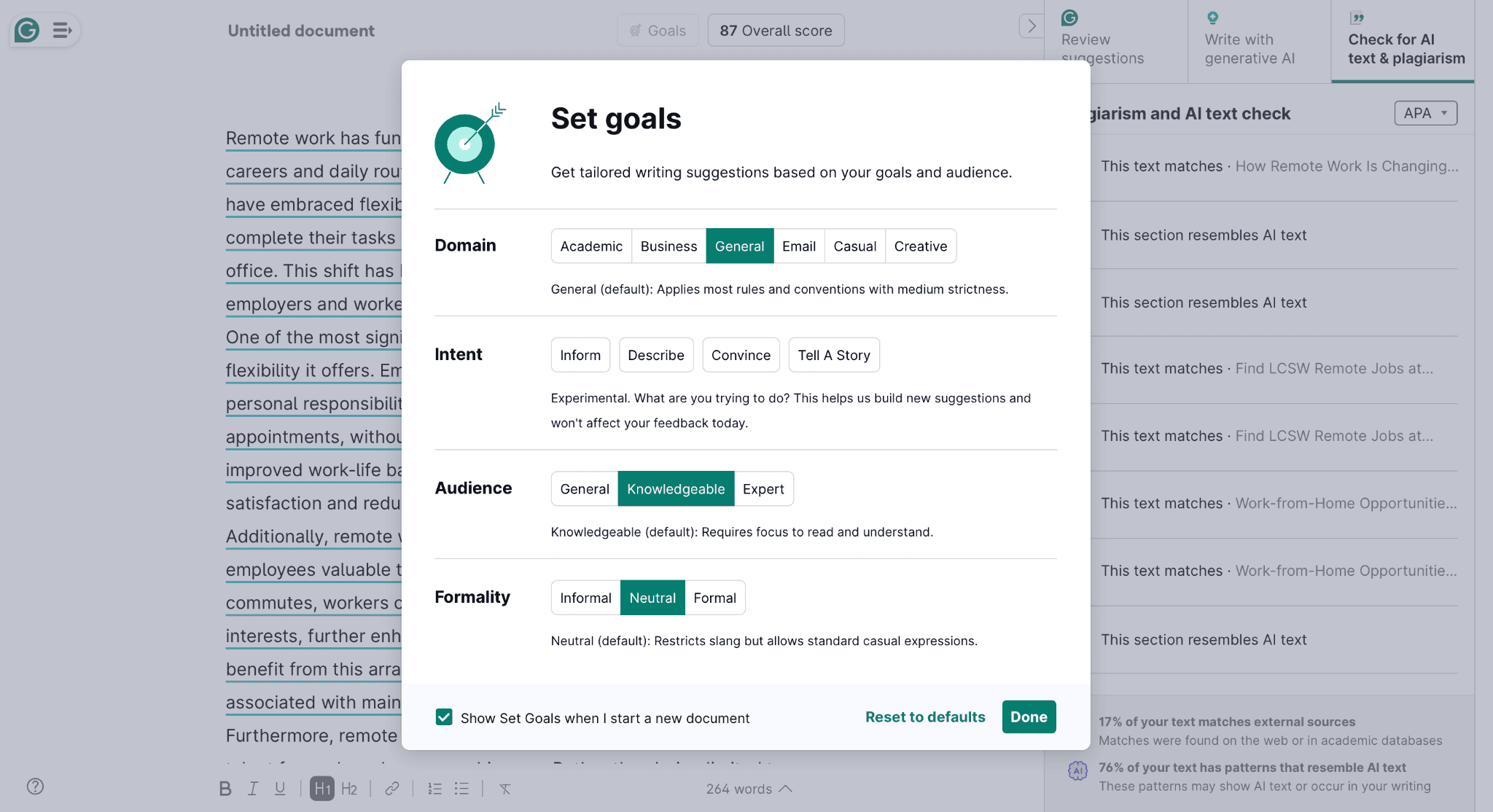
Worth noting that Grammarly itself labels the Intent setting “Experimental” in the interface, so it’s clearly still a work in progress on their end too. If grammar and clarity feedback is what you’re actually after, that part of Grammarly works as advertised! It’s specifically the AI-detection layer bolted onto it that we’d treat with more caution, and it’s worth pairing with a plain grammar checker if detection accuracy isn’t what you need most.
Detection Accuracy Beyond Our Own Test
Our two documents are a small sample, so it’s worth putting them in the context of the broader picture. Independent testers who’ve run Grammarly against fully AI-generated text report detection scores anywhere from the high 30s to the mid-80s depending on the sample and content type — short, casual text like emails tends to score worst, while longer academic-style writing tends to score best. That range aligns with what we saw: our AI sample landed at 76%, well within that range but nowhere near a clean catch.
On the benchmark side, Grammarly shows strong performance on RAID, a widely used academic dataset for testing AI detectors. However, independent testers using their own real-world samples have reported catch rates far below that benchmark. If you want to run an AI detection check with GetSolved to benchmark a document against real-world samples, you’ll see how independent testing often reveals a gap between controlled dataset scores and actual daily performance.
Who Gets Falsely Flagged Most Often
The ESL pattern we mentioned above isn’t a Grammarly-specific quirk. A widely cited academic study on non-native English writing found detectors across the board falsely flagging well over half of ESL-written essays as AI-generated. The reasons behind these findings are the same structural ones our own human-written test got flagged for: careful, grammatically precise writing looks statistically similar to AI output. If you’re an educator or a hiring manager leaning on Grammarly’s score to make a call about someone’s work, that’s the group most likely to get an unfair result. Therefore, we recommend evaluating the writing style and sentence structure yourself rather than relying on a single percentage score as a final verdict.
Can Grammarly’s Detector Be Bypassed?
Lightly paraphrasing AI text — running it through a rewriting tool before scanning it — consistently drops Grammarly’s AI score, often substantially, in tests we’ve seen reported across the board. That’s not unique to Grammarly either; it’s the same weakness most AI detectors share. Since surface-level rewording changes vocabulary without altering the underlying sentence rhythm, heavier, purpose-built tools that make AI-assisted text sound more natural actually target that rhythm.
The practical takeaway is the same one we’d give for any detector: a clean score after a light rewrite tells you the text passed one specific check, not that it’s actually undetectable everywhere.
Grammarly Authorship: A Genuinely Different Approach in AI Content
Buried in the paid tiers is a feature that works nothing like the percentage score: authorship. Instead of analyzing finished text after the fact, it logs how a document was actually produced in real time — keystrokes, paste events, AI-rewrite actions — and classifies content as typed by hand, AI-generated, AI-revised, or copied. That behavioral record is a genuinely different kind of evidence from a similarity score, and it’s more defensible if someone needs to prove how a document came together. The catch: it only works if you turn it on before you start writing, and it doesn’t track across devices, so switching from your laptop to your phone mid-document leaves a gap in the record.
💰 Pricing and Cancellation
We checked Grammarly’s pricing in real time. The catch is that Grammarly’s free AI detector is unavailable — this feature is simply not included in the free subscription. Thus, the only way to use their basic AI content detection is to subscribe.
What may be unpleasant for most users is that the subscription offers only a 2-day trial. Then, Grammarly offers a paid plan for $12/month. It will renew automatically unless you cancel the subscription before the free days end. That’s toward the lower end of what we’ve seen reported for Grammarly pro-level pricing elsewhere, so it’s worth confirming the current rate before you commit, since these things shift. However, remember that you are paying not only for an AI-detection agent but also for the full writing toolkit provided by Grammarly.
We also have some insights to share that we discovered ourselves. One thing worth knowing before you sign up: if you try to cancel, Grammarly’s flow offers a retention deal — in our case, more free days followed by 50% off — before it lets the cancellation go through. That’s a fairly standard subscription tactic, not unique to Grammarly, but it’s worth expecting rather than being surprised by if you’re trying to cancel quickly.
📌 Recommendation: Clarify the monthly/annual billing nuance (Grammarly Pro advertises $12/month, but that rate requires a $144 upfront annual commitment; monthly billing is around $30/month).
Grammarly AI Detector Alternatives
Grammarly’s main advantage is convenience — it’s already open in the tab you’re writing in, so running a check costs you nothing extra. However, purpose-built detectors generally outperform it on raw detection accuracy, particularly on short or lightly edited text. Several dedicated tools also provide a single, clear percentage alongside sentence-level breakdowns, rather than Grammarly’s buried aggregate number.
If you’re looking for a dedicated alternative, we’ve evaluated other major tools head-to-head using the same hands-on methodology. For example, our GPTZero review covers where it catches AI patterns that Grammarly misses and where it introduces its own false-positive risks in formal academic writing.
Final Verdict on Grammarly AI Detection Tool
Grammarly’s AI detection is a reasonable, no-extra-cost add-on if you’re already using Grammarly daily and just want a rough gut-check on a piece of writing. We recommend it for casual use, low stakes, nothing riding on the result. At the moment, it’s not built for anything more than that.
It’s a poor fit the moment the result actually matters: grading a student’s paper, screening a job applicant’s cover letter, or settling a real dispute about whether something was AI-written. Our own test flagged nearly half of a genuinely human-written essay as AI-resembling—a trend reflected across independent testing. Beyond false positives, we observed weaker detection on short or lightly edited text, no single definitive percentage, and minimal explanation for flagged passages. It only means that a Grammarly score alone isn’t strong enough evidence to act on. Treat it as one signal among several, not the deciding one, whichever detector you end up using.
To sum up, Grammarly’s AI detection is good for your daily writing tasks — not for a serious check before submitting your thesis or uploading a report to your boss. Still, it is fair to say that the universe of Grammarly is a good investment in your grammar or readability checking routine.
FAQ
Is Grammarly’s AI detector accurate?
It’s inconsistent. In our own test, it correctly flagged the majority of the fully AI-generated content. Still, it also flagged nearly half of a fully human-written document as AI-resembling. Independent testing generally puts its real-world detection accuracy well below what its benchmark scores suggest, particularly on shorter or lightly edited text.
Does Grammarly’s AI checker give a percentage score?
Not a single clean one, which is a missing AI detection feature. It flags individual sections directly in your document as resembling AI text, then shows one aggregate percentage at the bottom of the panel — you have to piece the two together yourself rather than reading one number.
Does Grammarly falsely flag human writing as AI?
Yes. We saw this directly in our own test, where a fully human-written essay was flagged as 48% AI-resembling. Formally structured, carefully argued writing appears to be at particular risk, which lines up with what non-native English writers report as well.
Can you bypass Grammarly’s AI detector?
Light paraphrasing tends to lower its AI score noticeably, the same weakness most detectors share, since it only shifts wording rather than the underlying sentence structure the detector is actually reading.
Is Grammarly’s AI detector free?
There’s no free AI checker by Grammarly — the tool is available only after a subscription. The paid tier includes a short two-day free trial before it renews automatically, so it’s worth checking the current terms before signing up. As far as their AI detection goes, it works more as a way to identify patterns that can be flagged as AI. We would consider paying for a subscription only if you aim to use other tools from Grammarly.
Is Grammarly The Best AI Detector?
Even though Grammarly’s tool is good, it cannot be called the best. This tool doesn’t provide a full breakdown of the AI percentage – it just flags sentences that may sound AI-generated without explaining why. It can also flag human text as AI-generated.