


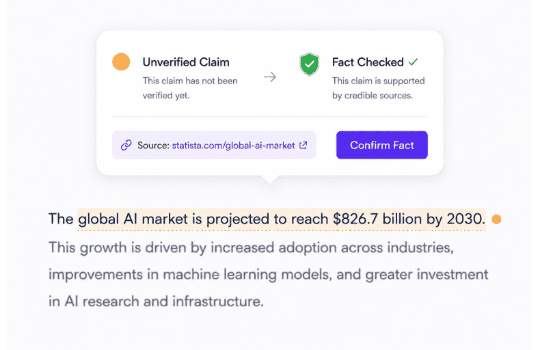


Flag Unsupported Claims
The tool scans generated text line by line and flags statements without verifiable backing, so you catch fabricated facts before a reader does.
Drop in a draft, article, or any AI-generated content you want to check. No file conversion or formatting cleanup is required before you start.
The hallucination detection tool highlights unsupported claims and questionable sources, each with a score and a brief note explaining why it was flagged. You'll also see which references to verify citations and sources before you rely on them.
Rewrite the flagged lines, swap out weak sources, and rerun the check. Once nothing stands out, you have a cleaner draft ready for your final review.
Every claim gets checked against real evidence, so you know exactly what to fix before anyone else spots it.
The tool scans generated text line by line and flags statements without verifiable backing, so you catch fabricated facts before a reader does.

References that look real but lead nowhere get flagged immediately. You get a list of exactly which citations need a second look.

Get an instant risk score for every response alongside concise explanations detailing why specific lines were flagged.
GetSolved’s hallucination detection tool supports different types of files, so you can upload any of the following directly to the tool: DOC, DOCX, TXT, PDF, ODT, RTF, HTM.

Combine hallucination checks with GetSolved's AI detector to find AI-generated patterns and confirm both how the text was written and whether its claims hold up.

Prevent factual errors and fabricated stats from reaching readers, protecting brand reputation across client reports, news, and docs.
Writers, editors, and content teams run their AI-assisted drafts through GetSolved before anything goes out. Here's what changed for them once they started. Jessica M. Writer Flagged three fake statistics fast. Marcus Thorne Newsletter Publisher I run every newsletter draft through this before it goes out, and last week it caught a quote that didn't exist anywhere online. If that had gone out to twelve thousand subscribers, I would've spent the next month apologizing. Grace Lin Editor Fast, clear, and it doesn't drown you in jargon. I trust the score enough to skip a second manual pass most days now. Kwame Mensah Journalist It tells me why, not just what. David Kim Blogger Caught a hallucinated source I almost linked to, right before the post went live. Elena R. UX Writer Solid, no-fuss checker for microcopy and help docs, which is honestly where most AI drafting mistakes hide. It doesn't try to do everything, it just does one thing well, and that's genuinely enough for our whole team now. Oliver Vance SEO Specialist I run AI-assisted drafts through it before publishing and let it identify claims that are real and sort away the confident-sounding nonsense. Cut my fact-checking time by a lot. Fatima Al-Sayed Customer Support Lead This tool helps catch potentially incorrect answers before customers see them. J. Alvarez Copywriter Genuinely changed how I proof AI drafts. The score gives me a starting point, and the explanations tell me exactly which lines to rewrite instead of re-reading the whole thing from scratch every time. Marco F. Small Business Owner Simple to use, and the flags actually make sense to someone without a marketing background. No learning curve at all, which matters more than people admit. Devon Miller Operations Director Nobody on our team publishes without running it first now. Maria Santos Writer It's picky, but that's exactly the point. A checker that never flags anything isn't actually checking for much, and this one clearly is. David K. Communications Director Handles long documents without slowing down, even mid-day. Michelle Creative Writer Caught two made-up statistics in a client draft last month, and honestly, I don't want to think about what would've happened if that had gone to print instead of getting flagged first. Tariq Al-Mansoor Technical Writer The citation checks alone are worth it for documentation work. Elena Vasquez Writer I like that it explains the flag instead of just scoring it, so I actually know what to fix. Priya Nandan Content Strategist Runs quietly in the background of our workflow now. R. Delacroix Marketing Manager Saved me from citing a source that turned out to be completely made up, and I only found out because the tool flagged it before the draft went anywhere near a client. Simon Achebe PR Consultant Quick to scan and easy to explain to clients. Hana Fujimoto Translator Works well across languages, which is genuinely rare for this kind of tool, and it's the reason I kept using it after the free trial ran out.
Users about GetSolved’s AI Hallucinations Checker


An AI hallucination occurs when a language model or large language model generates a response that sounds confident but lacks backing in natural language or real-world facts. Pre-trained language model architectures and complex model families predict the next likely word based on patterns in their training data, not through real-time factual verification.
When prompts push a generative AI model past its training limits, factual consistency starts to slip across several key failure modes:
To cut hallucinations at the source, use retrieval-augmented generation. This process pulls verified documents directly into the context window. As a result, the LLM outputs grounded statements rather than unbacked memory.
An automated hallucination score transforms subjective reviews into concrete metrics. You receive an immediate uncertainty score. This lets you verify the facts behind your sources before you publish.
Advanced hallucination detection tools assess factual accuracy and factual correctness by combining natural language inference, semantic similarity, and uncertainty estimation. Natural language processing systems check whether generated responses or a generated sequence logically align with a verified source. Low cosine similarity scores serve as an early warning that an answer is incorrect, triggering several automated consistency checks:
Pro tip: Identifying unbacked claims is only the first step in your workflow. Pair your hallucination detection pass with GetSolved’s fact checker to run targeted LLM calls or verify sources directly, ensuring complete factual accuracy across all generated summaries.
A targeted faithfulness evaluation assesses whether LLM outputs remain faithful to source documents or drift into unverified territory. Existing methods rely on structured setups to keep text grounded. Authors use a clear prompt template, a structured prompt, or few-shot examples to narrow the range of possible outputs. Prompt engineering techniques such as chain-of-thought prompting can catch factual errors early in the drafting stage.
High epistemic uncertainty indicates that a model lacks sufficient data to deliver a correct answer. When semantic similarity scores drop, the tool flags statements that contain incorrect answers or unsubstantiated assertions.
Factual hallucinations create major risks when reasoning models or generative models introduce potential hallucinations into client briefs or published reports. Broader confabulation detection methods target content that looks fluent in the target output format but lacks grounding in real events.
No single fix guarantees accuracy across all LLM calls. However, teams achieve a significant improvement in catching unsupported claims and factual errors when they pair generative tools with verification steps. Reinforcement learning and retrieval-augmented generation help mitigate hallucinations across complex drafts. GetSolved's hallucination-detection tool uses these state-of-the-art checks to help you catch errors before publication.
Get confidence in your content. Fast AI detection, smart grammar checks, and instant improvements in one place.
97.4% Positive Reviews
4.6 out of 5
Pricing


Accuracy depends on how specific and checkable the claims are. Clear factual statements with a verifiable source get scored reliably, while vague or opinion-based text is harder to evaluate. The tool works best as a first pass, not a final word — always read the explanation behind a flag before you decide what to change.
Yes. Your text is processed to generate a result and isn't shared, sold, or used to train other tools. You can check a draft without worrying about who else sees it.
No account is required for a basic check. Creating a free account gets you longer text limits and access to your check history.
An unverifiable source gets flagged with a note explaining why. From there, you can find reliable sources to replace it, rather than guessing whether the original claim still holds up.
Yes, though very long text may be processed in sections rather than all at once. Break longer drafts into parts for faster, more focused results.
No. The tool is built to detect hallucinations and flag claims that can be checked against real evidence, not subjective statements or forward-looking predictions, since those can't be verified either way.

