


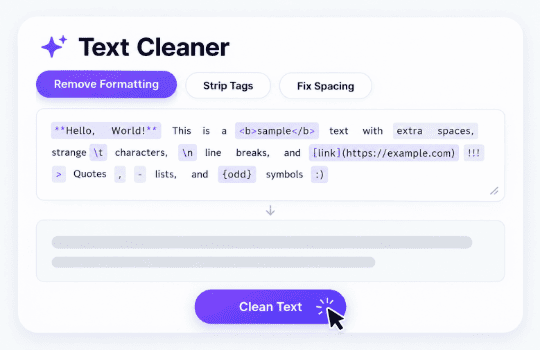


Strip Hidden Unicode Artifacts
Purge zero-width spaces, non-breaking spaces, and lookalike characters that quietly break site search, code, and CMS layouts.
Follow these three simple steps to strip hidden characters and formatting quirks from any AI-generated text.
Paste text from ChatGPT, Claude, Gemini, or any AI chat directly into the input box, or upload a file (PDF, Google Docs, TXT, etc.). A full document works just as well as a short paragraph.
Toggle which artifacts to remove, such as hidden characters, em dashes, smart quotes, or markdown headings, depending on what your text needs. Click Edit, and our tool will clean up your text.
Receive your edited text back in seconds. Compare your original and cleaned text side by side, then copy the result. Measure how easy your text is to read before you publish anywhere.
Explore the features below that clean up hidden characters, formatting quirks, and leftover markdown from any AI-generated text.
Purge zero-width spaces, non-breaking spaces, and lookalike characters that quietly break site search, code, and CMS layouts.

Convert stylized em-dashes, en-dashes, and curly quotes into standard hyphens and straight quotes for universal software compatibility.

Automatically strip asterisks, hash headers, and bullet syntax left over from AI chat windows so copy is plain-text ready.
Clean up double spaces, trailing whitespace, and excessive blank lines to ensure consistent paragraph flow across every channel.

Inspect original and cleaned drafts side by side before publishing. Check grammar and punctuation in the same pass to catch remaining issues fast.

Process text entirely in your browser without storing, saving, or transmitting your drafts to external servers.
See how GetSolved’s text cleaner catches hidden characters and formatting quirks before they cause problems, according to the people who use it. Silas Fenwick Developer Fixes broken quotes in code. Michelle Creative Writer I paste AI drafts here before moving them into my actual writing document, mostly because the spacing always looks slightly off in ways I can't quite explain until it breaks something later. Mireille Aubert Content Editor I paste a lot of AI-assisted drafts into our CMS, and hidden characters used to break the layout constantly without any obvious cause. Now I run every draft through this first, and the formatting issues disappear before anyone else even notices there was a problem. Tobias Krantz Copywriter Removes weird spacing I never noticed. Elin Kowalski SEO Specialist Em dashes and smart quotes from AI drafts kept showing up oddly in our CMS preview for weeks before I found this. Rohan Bhatt Technical Writer Code snippets from AI assistants used to break on paste. Fixed now. Marcus Thorne Newsletter Publisher Markdown leftovers used to clutter every single issue. Carys Llewellyn Marketing Manager Clean text, every single time. Desmond Achebe Freelance Writer I move text between a chat window and several different documents throughout the day, and the formatting quirks never showed up until something broke downstream. This catches em dashes, curly quotes, and hidden spacing before any of it reaches a client. Paloma Reyes Product Manager Turns out it was zero-width spaces the whole time. Anders Viklund Documentation Lead Hidden Unicode characters kept breaking our search index quietly, and I had no idea why. Grace Lin Editor Catches formatting quirks I would never spot. Nadia Farouk Blogger I write a lot of posts using AI as a starting point, and the pasted text always looked fine until it hit my CMS and broke spacing everywhere. Running it through this first fixes that before anything goes live. Colm Brennan Customer Support Rep Canned responses finally paste in cleanly. Sunniva Larsen Social Media Manager Captions drafted with AI assistance sometimes carried invisible characters that broke scheduling tools without any warning. This catches them first, so posts actually go out looking right. Jamal Nasser Journalist Quotes from AI drafts used to look wrong in our CMS. Verity Holt Small Business Owner Website copy drafted with AI help kept showing strange spacing issues once it went live, and I had no idea why until someone mentioned hidden characters. This caught the problem and the site finally looks the way it should. Emeka Dike Data Analyst Report text pastes cleanly into shared docs now. Ingrid Voss Newsletter Writer Every issue used to carry leftover markdown symbols from drafting in a chat window. Not anymore. David Kim Blogger I paste AI-assisted drafts here before anything goes into my CMS. Catches problems fast.
What Users of Text Cleaner Are Saying


Get confidence in your content. Fast AI detection, smart grammar checks, and instant improvements in one place.
97.4% Positive Reviews
4.6 out of 5

Yes, you can clean text for free to get started.
Our AI text cleaner only fixes formatting: hidden characters, dashes, quotes, and spacing. It doesn’t rewrite your sentences or change your original meaning.
Zero-width spaces, non-breaking spaces, and other invisible Unicode characters that can break code, search, or formatting once pasted elsewhere.
Yes, toggle individual options like em dashes, smart quotes, or markdown headings depending on what your text actually needs.
No, your text isn't stored once the result is ready. At GetSolved, your texts stay private.
Yes, text from ChatGPT, Claude, Gemini, or any other AI chat can be cleaned up the same way.
Cleanup only affects formatting, not word choice or sentence structure, so your writing sounds exactly the same.


